Para primeiro acesso devemos entender o seguinte.
Gerenciamento Out-of-band
A OLT G16 possui duas interfaces de gerenciamento out-of-band.
1 porta RJ-45 comunicação serial RS232 (9600/N/1/N). - "Porta de cima"
1 porta RJ-45 específica para gerenciamento (10/100 Ethernet). - "Porta de baixo"
Coloque o cabo de rede então na porta de baixo. Com o nome Ethernet.
Coloque ip no seu computador.
Exemplo:
IP:192.168.10.10
Mascara: 255.255.255.0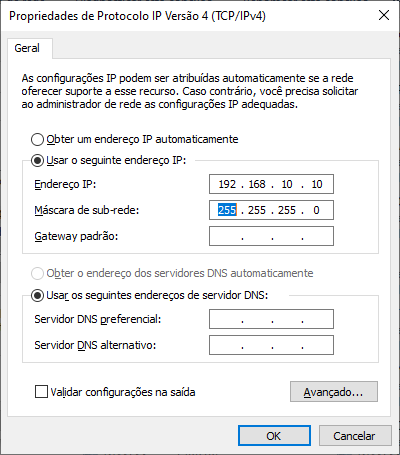
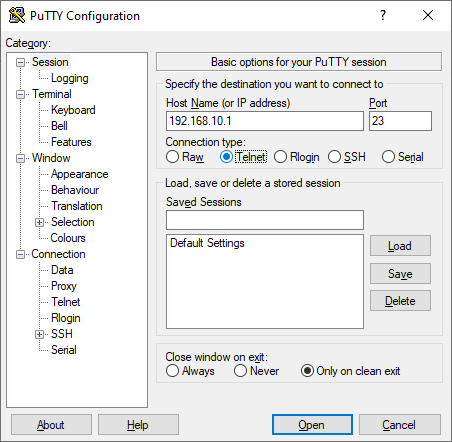
Acesse ela por Telnet.
IP: 192.168.10.1
Porta:23
user: admin
Senha: admin
###Caso queira resetar a OLT:
G16#clear startup-config
y
reboot
Alguns comando que certamente vai utilizar
enable(Modo visualização)
configure terminal(Modo configuração)
exit(voltar)
Salvar alterações:
Em Enable:
copy running-config startup-config
yes
Habilitar SSH:
ssh
G16(config)#ssh
Config SSH state successfully.
G16(config)#exit
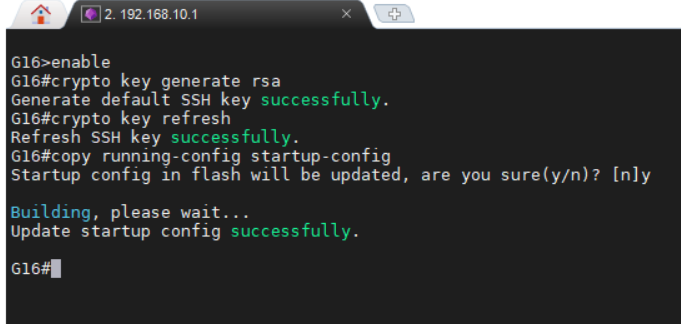
G16#crypto key generate rsa
Generate default SSH key successfully.
G16#
G16#crypto key refresh
Refresh SSH key successfully.
G16#
G16#show ssh
ssh version : 2.0
ssh state : on
ssh key file : available
G16(config)#ssh limit 10
G16#copy running-config startup-config
Startup config in flash will be updated, are you sure(y/n)? [n]y
Building, please wait...
Update startup config successfully.
Remover: no ssh
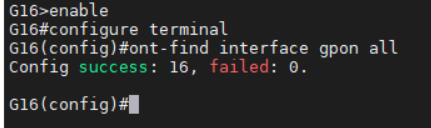
#Vamos ativar a descoberta de onus
G16>enable
G16#configure terminal
G16(config)#ont-find interface gpon all
Config success: 16, failed: 0.
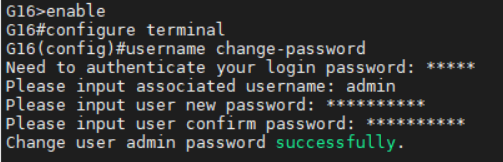
alterar Senha:
No modo de configuração(config):
username change-password
Need to authenticate your login password: admin
Please input associated username: admin
Please input user new password: SUASENHA
Please input user confirm password: SUASENHA
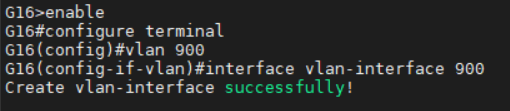
Vamos configurar uma Vlan de Uplink. (Onde chega o link)
Normalmente colocamos na porta sfp+1
G16(config)#vlan 900
G16(config-if-vlan)#interface vlan-interface 900
Create vlan-interface successfully!
Adicione IP a essa Vlan:
No caso a rede vai ser no ip: 192.168.19.1
Mascara: /29
Então colocamos a OLT com o IP 192.168.19.2 e com gateway 192.168.19.1
Colocando IP:
G16>enable
G16#configure terminal
G16(config)#interface vlan-interface 900
G16(config-if-vlanInterface-900)#ip address 192.168.19.2 255.255.255.248
This ipaddress will be the primary ipaddress of this interface.
Config ipaddress successfully!

Colocando Rota (Gateway)
G16>enable
G16#configure terminal
G16(config)#ip route 0.0.0.0 0.0.0.0 192.168.19.1
Config static route successfully!

Salve as configurações.
G16>enable
G16#copy running-config startup-config
Startup config in flash will be updated, are you sure(y/n)? [n]y
Building, please wait...
Update startup config successfully.

Vamos adicionar a Vlan 900 que criamos a interface que sera a UPLINK. Ou seja, a interface fisica da OLT que chega o link.
No nosso caso escolhemos a SFP+1
G16>enable
G16#configure terminal
G16(config)#interface ethernet 2/1
G16(config-if-ethernet-2/1)#switchport hybrid tagged vlan 900

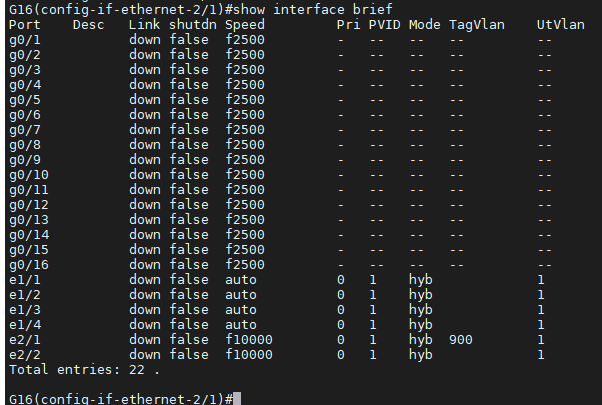
Para saber se foi atribuido certinho, pode pesquisar com o seguinte comando.
G16(config-if-ethernet-2/1)#show interface brief
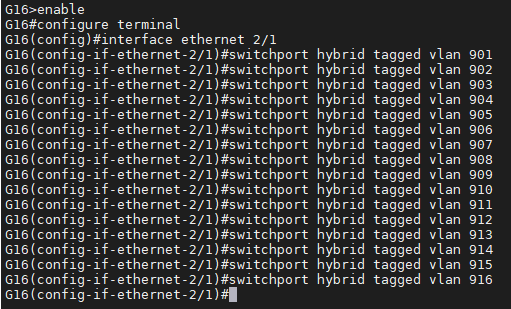
Agora vamos incluir as Vlans das Portas PONs na porta de UPLINK a OLT. No caso tbm é na interface que adicionamos a Vlan900.
Exemplo:
Se a OLT tem 16 portas, podemos incluir uma vlan por porta pon, dessa maneira gerenciamos melhor, evitamos alguns problemas.
Sempre crie o habito de gerenciar OLT com uma vlan por porta PON.
Nesse Exemplo criamos Vlan de 901 a 916.
Sendo que a 901 é da PON 1
902 é da PON 2
903 é da PON 3........ E assim por diante ate chegar a Vlan 916 na PON16.
G16>enable
G16#configure terminal
G16(config)#interface ethernet 2/1
G16(config-if-ethernet-2/1)#switchport hybrid tagged vlan 901
G16(config-if-ethernet-2/1)#switchport hybrid tagged vlan 902
G16(config-if-ethernet-2/1)#switchport hybrid tagged vlan 903
G16(config-if-ethernet-2/1)#switchport hybrid tagged vlan 904
G16(config-if-ethernet-2/1)#switchport hybrid tagged vlan 905
G16(config-if-ethernet-2/1)#switchport hybrid tagged vlan 906
G16(config-if-ethernet-2/1)#switchport hybrid tagged vlan 907
G16(config-if-ethernet-2/1)#switchport hybrid tagged vlan 908
G16(config-if-ethernet-2/1)#switchport hybrid tagged vlan 909
G16(config-if-ethernet-2/1)#switchport hybrid tagged vlan 910
G16(config-if-ethernet-2/1)#switchport hybrid tagged vlan 911
G16(config-if-ethernet-2/1)#switchport hybrid tagged vlan 912
G16(config-if-ethernet-2/1)#switchport hybrid tagged vlan 913
G16(config-if-ethernet-2/1)#switchport hybrid tagged vlan 914
G16(config-if-ethernet-2/1)#switchport hybrid tagged vlan 915
G16(config-if-ethernet-2/1)#switchport hybrid tagged vlan 916
G16(config-if-ethernet-2/1)#
Consulte se as vlans das PONs estão saindo pela nossa interface de UPLINK.
G16(config-if-ethernet-2/1)#show interface brief
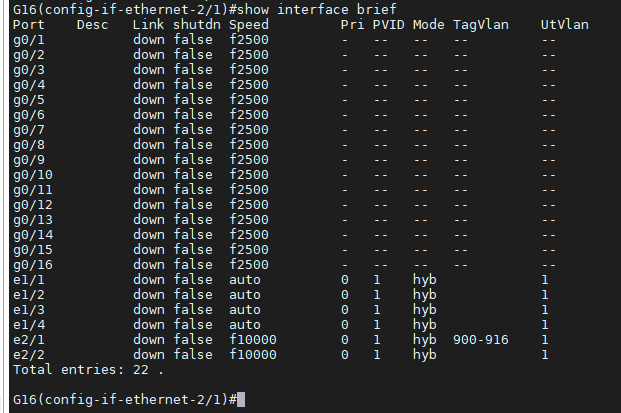
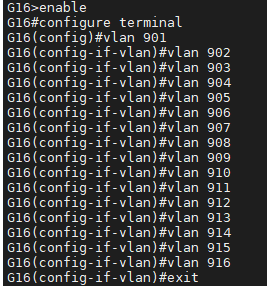
Vamos criar essas vlans de 901 a 916 na OLT. Pois ate agora só informamos que elas vão passar pela porta de UPLINK.
G16>enable
G16#configure terminal
G16(config)#vlan 901
G16(config-if-vlan)#vlan 902
G16(config-if-vlan)#vlan 903
G16(config-if-vlan)#vlan 904
G16(config-if-vlan)#vlan 905
G16(config-if-vlan)#vlan 906
G16(config-if-vlan)#vlan 907
G16(config-if-vlan)#vlan 908
G16(config-if-vlan)#vlan 909
G16(config-if-vlan)#vlan 910
G16(config-if-vlan)#vlan 911
G16(config-if-vlan)#vlan 912
G16(config-if-vlan)#vlan 913
G16(config-if-vlan)#vlan 914
G16(config-if-vlan)#vlan 915
G16(config-if-vlan)#vlan 916
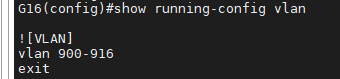
Consulte se foi aplicado as Vlans
G16(config)#show running-config vlan
Caso queira remover uma vlan:
G16(config)#no vlan 901
Delete static VLAN successfully.
Salve as Configurações
copy running-config startup-config
VAMOS CRIAR AS LINES DAS VLANS AGORA NA OLT
G16#configure terminal
G16(config)#deploy profile vlan
G16(deploy-profile-vlan)#aim 1 name VLAN901
G16(deploy-profile-vlan-1)#translate old-vlan 901 new-vlan 901
G16(deploy-profile-vlan-1)#active
G16(deploy-profile-vlan-1)#exit
Vamos repetir esse procedimento ate a VLAN916
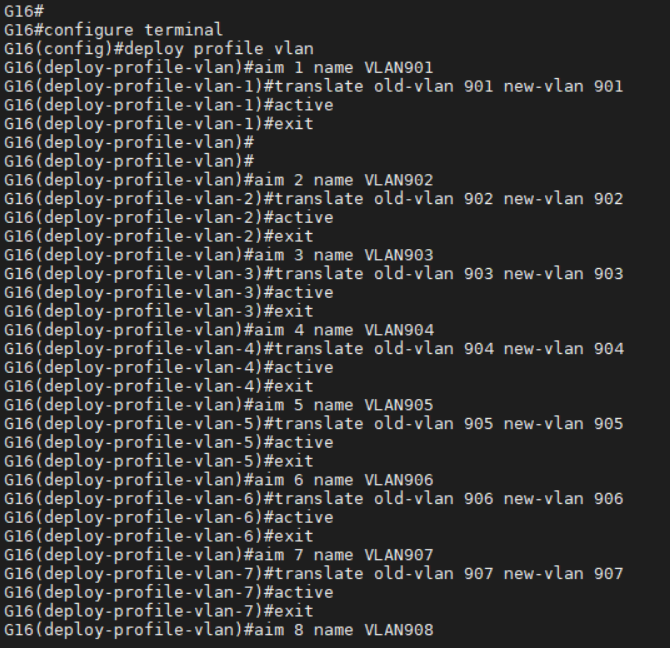
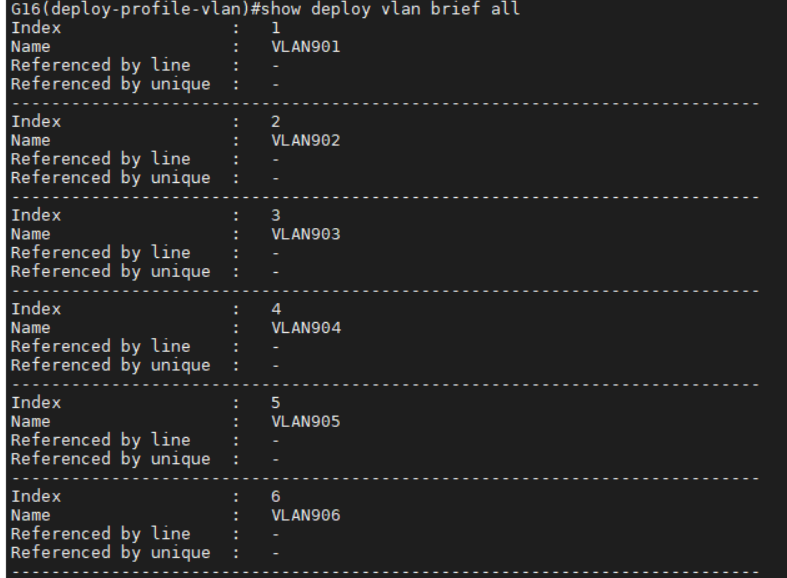
Para visualizar os profiles de vlans criadas.
G16(deploy-profile-vlan)#show deploy vlan brief all
Vamos criar o PROFILE de velocidade.
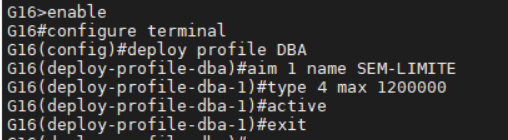
Vamos colocar o limite da porta mesmo.. Então criamos um unico profile de Velocidade. Com o nome "SEM-LIMITE". Pois quem gerencia a banda dos clientes é nosso sistema radius.
G16>enable
G16#configure terminal
G16(config)#deploy profile DBA
G16(deploy-profile-dba)#aim 1 name SEM-LIMITE
G16(deploy-profile-dba-1)#type 4 max 1200000
G16(deploy-profile-dba-1)#active
G16(deploy-profile-dba-1)#exit
#### Criar o Profile Line
Vamos criar dois tipos de Profile Line
Um para ONU Bridge
Outro para ONT
Um profile line para cada vlan na ONU
Um profile line para cada vlan na ONT
Então vai ser criado 32 Profile line
###Acesse:
deploy profile line
### Criando Profile line ONU Bride:
aim 101 name ONU110B-VLAN1101
device type i41-100
tcont 1 profile dba 1
gemport 1 tcont 1 vlan-profile 1101
mapping mode port-vlan
mapping 1 port eth 1 vlan 1101 gemport 1
flow 1 port eth 1 default vlan 1101
active
exit
Dae basta repetir o comando acima para o restante de todas as outras vlans, mudando sempre o numero 1101 para a vlan seguinte. Como, por exemplo, 1102, 1103.... Até 1116
***Exemplo para profile line ONU Bridge para vlan 1102
aim 101 name ONU110B-VLAN1102
device type i41-100
tcont 1 profile dba 1
gemport 1 tcont 1 vlan-profile 1102
mapping mode port-vlan
mapping 1 port eth 1 vlan 1102 gemport 1
flow 1 port eth 1 default vlan 1102
active
exit
### Caso queira deletar um criado.
delete aim 103
Vamos criar mais 16 Profile line para ONTs
### Criando Profile line ONT
aim 201 name ONT121AC-    VLAN1101
device type i41-211
tcont 1 profile dba 1
gemport 1 tcont 1 vlan-profile 1101
mapping mode port-vlan
mapping 1 port veip vlan 1101 gemport 1
flow 1 port veip vlan 1101 keep
active
exit
Segue a sequência ate a vlan 1116. Exemplo:
aim 201 name ONT121AC-VLAN1102
device type i41-211
tcont 1 profile dba 1
gemport 1 tcont 1 vlan-profile 1102
mapping mode port-vlan
mapping 1 port veip vlan 1102 gemport 1
flow 1 port veip vlan 1102 keep
active
exit
###Salve tudo que fez
G16#copy running-config startup-config
Segue em anexo o arquivo. Basta editar as vlans.
aim 101 name ONT121AC-VLAN1701-PON1
device type i41-211
tcont 1 profile dba 1
gemport 1 tcont 1 vlan-profile 1701
mapping mode port-vlan
mapping 1 port veip vlan 1701 gemport 1
flow 1 port veip vlan 1701 keep
active
exit
aim 102 name ONT121AC-VLAN1701-PON2
device type i41-211
tcont 1 profile dba 1
gemport 1 tcont 1 vlan-profile 1701
mapping mode port-vlan
mapping 1 port veip vlan 1701 gemport 1
flow 1 port veip vlan 1701 keep
active
exit
aim 103 name ONT121AC-VLAN1701-PON3
device type i41-211
tcont 1 profile dba 1
gemport 1 tcont 1 vlan-profile 1701
mapping mode port-vlan
mapping 1 port veip vlan 1701 gemport 1
flow 1 port veip vlan 1701 keep
active
exit
aim 104 name ONT121AC-VLAN1701-PON4
device type i41-211
tcont 1 profile dba 1
gemport 1 tcont 1 vlan-profile 1701
mapping mode port-vlan
mapping 1 port veip vlan 1701 gemport 1
flow 1 port veip vlan 1701 keep
active
exit
aim 105 name ONT121AC-VLAN1701-PON5
device type i41-211
tcont 1 profile dba 1
gemport 1 tcont 1 vlan-profile 1701
mapping mode port-vlan
mapping 1 port veip vlan 1701 gemport 1
flow 1 port veip vlan 1701 keep
active
exit
aim 106 name ONT121AC-VLAN1701-PON6
device type i41-211
tcont 1 profile dba 1
gemport 1 tcont 1 vlan-profile 1701
mapping mode port-vlan
mapping 1 port veip vlan 1701 gemport 1
flow 1 port veip vlan 1701 keep
active
exit
aim 107 name ONT121AC-VLAN1701-PON7
device type i41-211
tcont 1 profile dba 1
gemport 1 tcont 1 vlan-profile 1701
mapping mode port-vlan
mapping 1 port veip vlan 1701 gemport 1
flow 1 port veip vlan 1701 keep
active
exit
aim 108 name ONT121AC-VLAN1701PON3-PON8
device type i41-211
tcont 1 profile dba 1
gemport 1 tcont 1 vlan-profile 1701
mapping mode port-vlan
mapping 1 port veip vlan 1701 gemport 1
flow 1 port veip vlan 1701 keep
active
exit
aim 109 name ONT121AC-VLAN1701-PON9
device type i41-211
tcont 1 profile dba 1
gemport 1 tcont 1 vlan-profile 1701
mapping mode port-vlan
mapping 1 port veip vlan 1701 gemport 1
flow 1 port veip vlan 1701 keep
active
exit
aim 110 name ONT121AC-VLAN1701-PON10
device type i41-211
tcont 1 profile dba 1
gemport 1 tcont 1 vlan-profile 1701
mapping mode port-vlan
mapping 1 port veip vlan 1701 gemport 1
flow 1 port veip vlan 1701 keep
active
exit
aim 111 name ONT121AC-VLAN1701-PON11
device type i41-211
tcont 1 profile dba 1
gemport 1 tcont 1 vlan-profile 1701
mapping mode port-vlan
mapping 1 port veip vlan 1701 gemport 1
flow 1 port veip vlan 1701 keep
active
exit
aim 112 name ONT121AC-VLAN1701-PON12
device type i41-211
tcont 1 profile dba 1
gemport 1 tcont 1 vlan-profile 1701
mapping mode port-vlan
mapping 1 port veip vlan 1701 gemport 1
flow 1 port veip vlan 1701 keep
active
exit
aim 113 name ONT121AC-VLAN1701-PON13
device type i41-211
tcont 1 profile dba 1
gemport 1 tcont 1 vlan-profile 1701
mapping mode port-vlan
mapping 1 port veip vlan 1701 gemport 1
flow 1 port veip vlan 1701 keep
active
exit
aim 114 name ONT121AC-VLAN1701-PON14
device type i41-211
tcont 1 profile dba 1
gemport 1 tcont 1 vlan-profile 1701
mapping mode port-vlan
mapping 1 port veip vlan 1701 gemport 1
flow 1 port veip vlan 1701 keep
active
exit
aim 115 name ONT121AC-VLAN1701-PON15
device type i41-211
tcont 1 profile dba 1
gemport 1 tcont 1 vlan-profile 1701
mapping mode port-vlan
mapping 1 port veip vlan 1701 gemport 1
flow 1 port veip vlan 1701 keep
active
exit
aim 116 name ONT121AC-VLAN1701-PON16
device type i41-211
tcont 1 profile dba 1
gemport 1 tcont 1 vlan-profile 1701
mapping mode port-vlan
mapping 1 port veip vlan 1701 gemport 1
flow 1 port veip vlan 1701 keep
active
exit
###ONU
aim 201 name ONU110B-VLAN1701-PON1
device type i41-100
tcont 1 profile dba 1
gemport 1 tcont 1 vlan-profile 1701
mapping mode port-vlan
mapping 1 port eth 1 vlan 1701 gemport 1
flow 1 port eth 1 default vlan 1701
active
exit
aim 202 name ONU110B-VLAN1701-PON2
device type i41-100
tcont 1 profile dba 1
gemport 1 tcont 1 vlan-profile 1701
mapping mode port-vlan
mapping 1 port eth 1 vlan 1701 gemport 1
flow 1 port eth 1 default vlan 1701
active
exit
aim 203 name ONU110B-VLAN1701-PON3
device type i41-100
tcont 1 profile dba 1
gemport 1 tcont 1 vlan-profile 1701
mapping mode port-vlan
mapping 1 port eth 1 vlan 1701 gemport 1
flow 1 port eth 1 default vlan 1701
active
exit
aim 204 name ONU110B-VLAN1701-PON4
device type i41-100
tcont 1 profile dba 1
gemport 1 tcont 1 vlan-profile 1701
mapping mode port-vlan
mapping 1 port eth 1 vlan 1701 gemport 1
flow 1 port eth 1 default vlan 1701
active
exit
aim 205 name ONU110B-VLAN1701-PON5
device type i41-100
tcont 1 profile dba 1
gemport 1 tcont 1 vlan-profile 1701
mapping mode port-vlan
mapping 1 port eth 1 vlan 1701 gemport 1
flow 1 port eth 1 default vlan 1701
active
exit
aim 206 name ONU110B-VLAN1701-PON6
device type i41-100
tcont 1 profile dba 1
gemport 1 tcont 1 vlan-profile 1701
mapping mode port-vlan
mapping 1 port eth 1 vlan 1701 gemport 1
flow 1 port eth 1 default vlan 1701
active
exit
aim 207 name ONU110B-VLAN1701-PON7
device type i41-100
tcont 1 profile dba 1
gemport 1 tcont 1 vlan-profile 1701
mapping mode port-vlan
mapping 1 port eth 1 vlan 1701 gemport 1
flow 1 port eth 1 default vlan 1701
active
exit
aim 208 name ONU110B-VLAN1701-PON8
device type i41-100
tcont 1 profile dba 1
gemport 1 tcont 1 vlan-profile 1701
mapping mode port-vlan
mapping 1 port eth 1 vlan 1701 gemport 1
flow 1 port eth 1 default vlan 1701
active
exit
aim 209 name ONU110B-VLAN1701-PON9
device type i41-100
tcont 1 profile dba 1
gemport 1 tcont 1 vlan-profile 1701
mapping mode port-vlan
mapping 1 port eth 1 vlan 1701 gemport 1
flow 1 port eth 1 default vlan 1701
active
exit
aim 210 name ONU110B-VLAN1701-PON10
device type i41-100
tcont 1 profile dba 1
gemport 1 tcont 1 vlan-profile 1701
mapping mode port-vlan
mapping 1 port eth 1 vlan 1701 gemport 1
flow 1 port eth 1 default vlan 1701
active
exit
aim 211 name ONU110B-VLAN1701-PON11
device type i41-100
tcont 1 profile dba 1
gemport 1 tcont 1 vlan-profile 1701
mapping mode port-vlan
mapping 1 port eth 1 vlan 1701 gemport 1
flow 1 port eth 1 default vlan 1701
active
exit
aim 212 name ONU110B-VLAN1701-PON12
device type i41-100
tcont 1 profile dba 1
gemport 1 tcont 1 vlan-profile 1701
mapping mode port-vlan
mapping 1 port eth 1 vlan 1701 gemport 1
flow 1 port eth 1 default vlan 1701
active
exit
aim 213 name ONU110B-VLAN1701-PON13
device type i41-100
tcont 1 profile dba 1
gemport 1 tcont 1 vlan-profile 1701
mapping mode port-vlan
mapping 1 port eth 1 vlan 1701 gemport 1
flow 1 port eth 1 default vlan 1701
active
exit
aim 214 name ONU110B-VLAN1701-PON14
device type i41-100
tcont 1 profile dba 1
gemport 1 tcont 1 vlan-profile 1701
mapping mode port-vlan
mapping 1 port eth 1 vlan 1701 gemport 1
flow 1 port eth 1 default vlan 1701
active
exit
aim 215 name ONU110B-VLAN1701-PON15
device type i41-100
tcont 1 profile dba 1
gemport 1 tcont 1 vlan-profile 1701
mapping mode port-vlan
mapping 1 port eth 1 vlan 1701 gemport 1
flow 1 port eth 1 default vlan 1701
active
exit
aim 216 name ONU110B-VLAN1701-PON16
device type i41-100
tcont 1 profile dba 1
gemport 1 tcont 1 vlan-profile 1701
mapping mode port-vlan
mapping 1 port eth 1 vlan 1701 gemport 1
flow 1 port eth 1 default vlan 1701
active
exit
Este artigo foi útil?
Que bom!
Obrigado pelo seu feedback
Desculpe! Não conseguimos ajudar você
Obrigado pelo seu feedback
Feedback enviado
Agradecemos seu esforço e tentaremos corrigir o artigo